
MCP connectors (reference)
TaTi does not embed all integration logic in the web binary: each domain (Slack, cloud, database…) is served by an MCP bridge — a small HTTP service compatible with the Model Context Protocol. Run them with Docker Compose (or manually), then register their URL in the UI: Settings → MCP servers (repo presets follow service names and /mcp paths). The UI preset grid is shown in Introduction — New MCP server.
Reminder
The ports below are default host ports from .env.example. You can change them: keep .env, docker compose, and the URL saved in TaTi consistent (e.g. if you change MCP_SLACK_PORT, http://localhost:…/mcp changes too).
MCP architecture (overview)
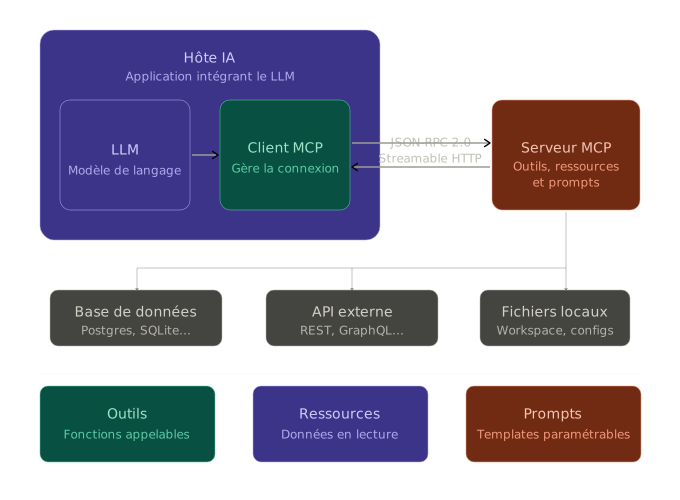
This diagram highlights the separation of responsibilities:
- TaTi UI / API: orchestrates the conversation, decides which tools to call, and consolidates outputs.
- MCP servers: expose specialized capabilities (Slack, GitHub, DB, cloud, observability) through a uniform MCP interface.
- Target systems: remain behind MCP connectors, with their own permissions, tokens, and guardrails.
- Main benefit: add a new business domain by plugging a new MCP server, without changing TaTi core.
MCP call flow (step by step)
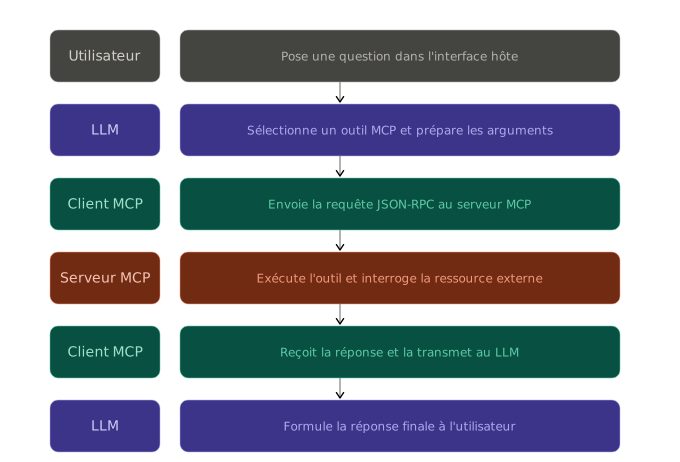
Typical MCP call execution cycle:
- The user sends a request in TaTi.
- The model decides an MCP tool is needed (for example dashboard, SQL, ticket, observability).
- TaTi calls the relevant MCP server with the useful context.
- The MCP server executes the action on the external system and returns a structured result.
- TaTi reformulates the final answer for the user using retrieved data.
Security note: effective permissions are those of the server token/account, not model permissions.
Summary table
| Connector | Host port (default) | Typical URL (Compose network) | Key variables |
|---|---|---|---|
| OpenMetadata | 8001 | http://mcp-openmetadata:8001/mcp | OPENMETADATA_URL, OPENMETADATA_JWT |
| Metabase MCP | — (HTTPS) | https://YOUR-METABASE/api/mcp | OAuth 2.0 access token, MB_SITE_URL in Metabase |
| Tableau MCP | 8024 → 3927 internal | http://mcp-tableau:3927/tableau-mcp | TABLEAU_SERVER_URL, TABLEAU_SITE_NAME, TABLEAU_PAT_* (or OAuth) |
| PostgreSQL | 8002 | http://mcp-postgres:8002/mcp | MCP_POSTGRES_DATABASE_URL, MCP_POSTGRES_READ_ONLY |
| 8003 | http://mcp-pdf:8003/mcp | MCP_PDF_PUBLIC_BASE_URL | |
| Notion | 8004 | http://mcp-notion:8004/mcp | MCP_NOTION_TOKEN |
| GitHub | 8007 | http://mcp-github:8007/mcp | MCP_GITHUB_TOKEN |
| GitLab | 8008 | http://mcp-gitlab:8008/mcp | MCP_GITLAB_TOKEN, MCP_GITLAB_URL |
| Atlassian Rovo MCP | — (HTTPS) | https://mcp.atlassian.com/v1/mcp | OAuth 2.1 access token |
| monday.com MCP | — (HTTPS) | https://mcp.monday.com/mcp | OAuth access token (+ optional Api-Version) |
| Linear MCP | — (HTTPS) | https://mcp.linear.app/mcp | OAuth 2.1 access token |
| Elasticsearch | 8009 → 8080 internal | http://mcp-elasticsearch:8080/mcp | MCP_ELASTICSEARCH_* |
| Discord | 8010 | http://mcp-discord:8010/mcp | MCP_DISCORD_* |
| Filesystem | 8011 | http://mcp-filesystem:8011/mcp | MCP_FILESYSTEM_ROOT |
| AWS | 8012 | http://mcp-aws:8012/mcp | AWS_* |
| Azure | 8013 | http://mcp-azure:8013/mcp | AZURE_* |
| GCP | 8014 | http://mcp-gcp:8014/mcp | GCP_* |
| Email SMTP | 8015 | http://mcp-email:8015/mcp | SMTP_* |
| Dagster | 8016 | http://mcp-dagster:8016/mcp | DAGSTER_GRAPHQL_URL, DAGSTER_API_TOKEN |
| Apache Airflow | 8017 | http://mcp-airflow:8017/mcp | AIRFLOW_BASE_URL, AIRFLOW_USERNAME / AIRFLOW_PASSWORD |
| dbt Cloud | 8018 | http://mcp-dbt:8018/mcp | DBT_CLOUD_DISCOVERY_URL, DBT_CLOUD_TOKEN, DBT_CLOUD_ENVIRONMENT_ID |
| dbt Core | 8019 | http://mcp-dbt-core:8019/mcp | DBT_CORE_HOST_PROJECT, DBT_PROFILES_DIR, DBT_ALLOW_MUTATIONS |
| Slack | 8006 | http://mcp-slack:8006/mcp | MCP_SLACK_* |
| Grafana | 8020 | http://mcp-grafana:8020/mcp | MCP_GRAFANA_* |
| Prometheus | 8021 | http://mcp-prometheus:8021/mcp | MCP_PROMETHEUS_* |
| n8n Builder MCP | 8022 | http://mcp-n8n:3000/mcp | MCP_N8N_API_URL, MCP_N8N_API_KEY, MCP_N8N_AUTH_TOKEN |
| MuleSoft DX MCP | 8023 | http://mcp-mulesoft:8023/mcp | ANYPOINT_CLIENT_ID, ANYPOINT_CLIENT_SECRET, ANYPOINT_REGION |
| Salesforce Hosted MCP | — (HTTPS) | https://api.salesforce.com/... | MCP_SALESFORCE_MCP_URL, SALESFORCE_OAUTH_CLIENT_ID, access token |
| HubSpot MCP | — (HTTPS) | https://mcp.hubspot.com/ | HubSpot MCP auth app + OAuth access token |
| Zendesk MCP | 8025 | http://mcp-zendesk:8025/mcp | ZENDESK_SUBDOMAIN, ZENDESK_EMAIL, ZENDESK_API_KEY |
| ServiceNow MCP | 8026 | http://mcp-servicenow:8026/mcp | SERVICENOW_INSTANCE_URL, basic/token/OAuth auth |
| Datadog | — (HTTPS) | See Datadog section | MCP_DATADOG_* + headers |
| Brevo | — (HTTPS) | See Brevo section | MCP_BREVO_MCP_URL, MCP_BREVO_MCP_TOKEN (Bearer header) |
| Google Gmail / Calendar | — (HTTPS) | Google MCP endpoints | GOOGLE_*, OAuth |
| Moodle | — (HTTPS) | Moodle plugin URL | MCP_MOODLE_* |
The sections below cover role, typical use, what the bridge usually exposes, configuration, and pitfalls.
MCP OpenMetadata
Role: MCP tools to query (and optionally change) metadata in OpenMetadata — tables, columns, glossaries, tags, lineage, business properties.
Typical use: “Which table feeds this report?”, “Who owns this dataset?”, “Show lineage around customers.”
Setup: Compose service mcp-openmetadata, port 8001. URL in TaTi: http://mcp-openmetadata:8001/mcp. Vars: OPENMETADATA_URL, OPENMETADATA_JWT, optional OPENMETADATA_ALLOW_MUTATIONS, OPENMETADATA_WRITE_CONFIRM_TOKEN.
WARNING
Catalog mutations are sensitive: keep OPENMETADATA_ALLOW_MUTATIONS=false until flows are validated.
MCP Metabase
Role: connect TaTi to the MCP server built into your Metabase instance (/api/mcp) to explore BI metadata, query tables and metrics, create questions, and build dashboards. Results are scoped to the permissions of the Metabase user who authorizes the client.
Typical use with TaTi
- Search tables, metrics, and Metabase questions by keyword or natural language.
- Construct and execute controlled queries through
construct_query,execute_query, orquery. - Create questions and dashboards from a business brief.
- Prepare file-based dashboards using real table names, fields, and sample values.
- Combine Metabase context with Slack, Linear, GitHub, Jira, or monday.com to explain a KPI.
Setup in Metabase
- Use Metabase 0.61+ with AI/MCP features available.
- Go to Admin → AI → MCP.
- Enable MCP server.
- Allow the needed clients (Cursor / VS Code, Claude, ChatGPT) or add your self-hosted client domain.
- Make sure Site URL or
MB_SITE_URLexactly matches the public URL used by TaTi.
Setup in TaTi
- Settings → MCP Servers → preset Metabase.
- Replace the URL with your endpoint:
https://<your-metabase>/api/mcp. - Headers JSON:json
{ "Authorization": "Bearer <YOUR_METABASE_ACCESS_TOKEN>" } - Enable the server, then Test.
WARNING
Metabase runs its own embedded OAuth 2.0 server. TaTi can call the endpoint with a Bearer token but does not run the full OAuth flow in the UI yet. If OAuth fails without a consent screen, check MB_SITE_URL / Site URL first.
Exposed tools
search, get_table, get_table_field_values, get_metric, get_metric_field_values, construct_query, execute_query, query, create_question, create_dashboard.
Official docs: Metabase MCP server
MCP Tableau
Role: connect TaTi to Tableau’s official MCP server (@tableau/mcp-server) to explore Tableau Cloud or Tableau Server: published data sources, workbooks, projects, views, custom views, VizQL Data Service queries, metadata, and Tableau Pulse.
Typical use with TaTi
- List and search Tableau data sources, workbooks, projects, and views.
- Read field metadata for a published data source.
- Execute a VizQL query through
query-datasource. - Retrieve CSV data or images from views and custom views.
- Query Tableau Pulse: metric definitions, metrics, subscriptions, insight bundles, and insight briefs.
- Combine Tableau KPIs with Metabase, Slack, Linear, Jira, GitHub, or monday.com context.
MCP architecture: Tableau + Atlassian
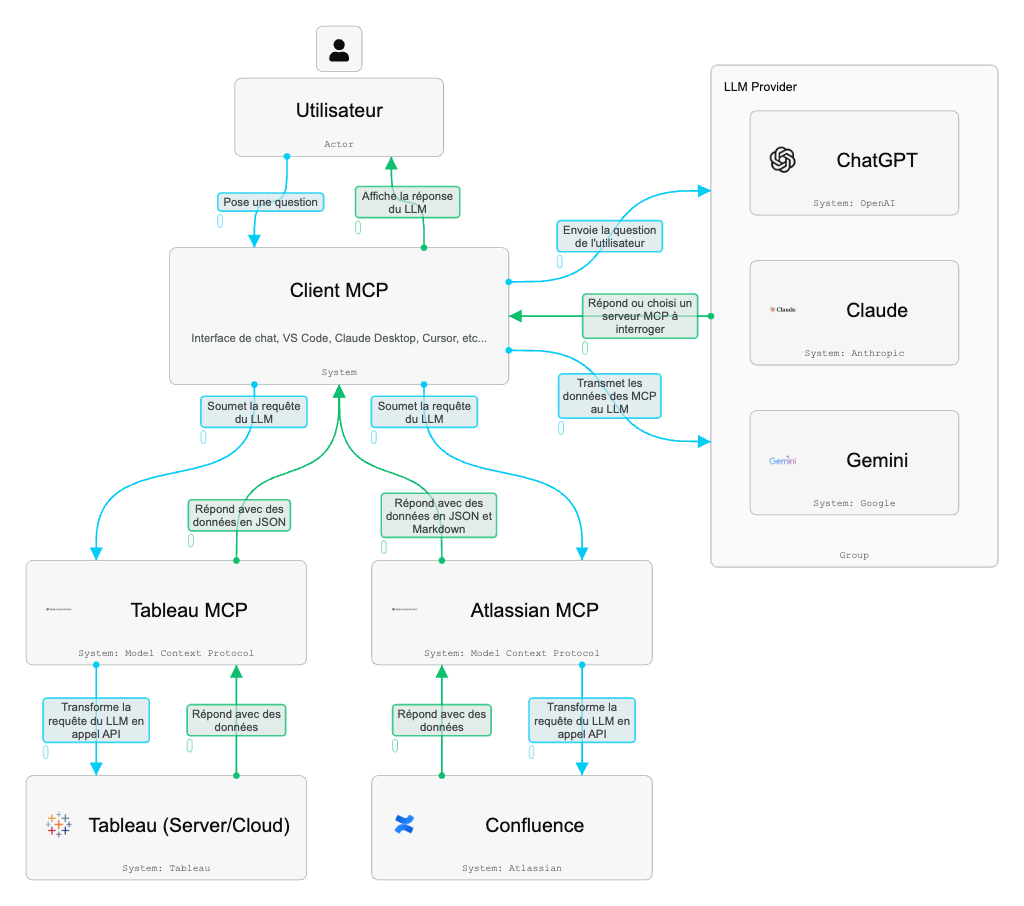
In this model, the MCP client (Cursor, Claude Desktop, VS Code, or TaTi) orchestrates calls: the LLM decides which tools to use, then the client forwards requests to the right server. Tableau MCP turns requests into Tableau Server/Cloud API calls (REST, Metadata, VizQL, Pulse), while Atlassian MCP relays actions to Confluence/Jira. The LLM receives structured JSON/Markdown responses and combines them into the user-facing answer.
Deploying the Tableau MCP server
The official server is not a single SaaS endpoint: run @tableau/mcp-server and expose it with Streamable HTTP so TaTi can call it.
Typical configuration:
TRANSPORT=http
PORT=3927
SERVER=https://<your-tableau-cloud-or-server>
SITE_NAME=<site-content-url>
PAT_NAME=<personal-access-token-name>
PAT_VALUE=<token-value>
For multi-user deployments, Tableau recommends OAuth:
TRANSPORT=http
OAUTH_ISSUER=https://tableau-mcp.example.com
The MCP HTTP endpoint is usually:
https://tableau-mcp.example.com/tableau-mcpCompose + .env setup
- Set
.env:TABLEAU_SERVER_URL,TABLEAU_SITE_NAME,TABLEAU_PAT_NAME,TABLEAU_PAT_VALUE. - Start the service:
docker compose up -d mcp-tableau. - The container runs
@tableau/mcp-serverwithTRANSPORT=httpon port 3927 (host 8024).
Setup in TaTi
- Settings → MCP Servers → preset Tableau.
- Default Compose URL:
http://mcp-tableau:3927/tableau-mcp. - Headers JSON: leave empty in PAT mode (Tableau auth is handled by the
mcp-tableaucontainer). - Enable the server, then Test.
WARNING
Do not point TaTi directly at https://online.tableau.com or your Tableau Server URL. Point it at the Tableau MCP server, which then calls Tableau APIs (REST, Metadata, VDS, Pulse).
Exposed tools
list-datasources, list-workbooks, list-projects, list-views, list-custom-views, get-datasource-metadata, get-workbook, get-view-data, get-view-image, get-custom-view-data, get-custom-view-image, query-datasource, search-content, list-all-pulse-metric-definitions, generate-pulse-insight-brief.
Official docs: Tableau MCP · GitHub tableau/tableau-mcp
MCP PostgreSQL
Role: Run SQL against Postgres (often a business DB — may be the same instance as TaTi; scope carefully).
Typical use: schema exploration, read-only analytics (SELECT), avoid dumping copies manually.
Setup: Port 8002, URL http://mcp-postgres:8002/mcp. Vars: MCP_POSTGRES_DATABASE_URL, MCP_POSTGRES_READ_ONLY (true recommended for discovery).
TIP
Even read-only SELECT can load the DB — isolate networks and define SQL policy.
MCP PDF
Role: Generate PDFs and return download URLs.
Setup: Port 8003, MCP_PDF_PUBLIC_BASE_URL must be reachable by browsers following links.
MCP Notion
Role: Access Notion databases and pages via integration token permissions.
Setup: Port 8004, MCP_NOTION_TOKEN.
MCP Slack
Role: Read history (per scopes) and post via a bot; optionally restrict channels.
Setup: Port 8006. Vars: MCP_SLACK_BOT_TOKEN, MCP_SLACK_TEAM_ID, MCP_SLACK_CHANNEL_IDS (recommended to limit channels).
MCP Discord
Role: Discord equivalent of the Slack bridge — guild channels and bot permissions.
Setup: Port 8010, MCP_DISCORD_BOT_TOKEN, MCP_DISCORD_GUILD_ID, MCP_DISCORD_CHANNEL_IDS.
MCP Filesystem
Role: List/read (and sometimes write) files under a single root (FILESYSTEM_ROOT).
Setup: Port 8011, MCP_FILESYSTEM_ROOT. In production use a dedicated volume and strict permissions.
MCP GitHub
Role: Automate GitHub workflows — issues, PRs, CI context.
Setup: Port 8007, MCP_GITHUB_TOKEN, MCP_WRITE_CONFIRM_TOKEN for guarded writes.
MCP GitLab
Role: Projects, issues, merge requests — SaaS or self-hosted GitLab.
Setup: Port 8008, MCP_GITLAB_TOKEN, MCP_GITLAB_URL.
MCP Elasticsearch
Role: Full-text search and index operations — depends on MCP image and stack version.
Setup: Host 8009 mapped to 8080 in container — URL http://mcp-elasticsearch:8080/mcp. Vars: MCP_ELASTICSEARCH_URL, credentials, optional MCP_ELASTICSEARCH_SSL_SKIP_VERIFY.
MCP AWS
Role: AWS APIs — often read-only inventory; mutations are high-risk.
Setup: Port 8012, AWS_REGION, AWS_PROFILE or static keys / session token.
MCP Azure
Role: Azure resources via ARM or APIs exposed by the bridge.
Setup: Port 8013, Service Principal or AZURE_ACCESS_TOKEN. Prefer Reader for exploration.
MCP GCP
Role: GCP project resources — Compute, GKE, storage, IAM reads per service account.
Setup: Port 8014, GCP_PROJECT_ID, GCP_REGION, GCP_SERVICE_ACCOUNT_JSON (never commit).
MCP Email (SMTP)
Role: Send mail via SMTP — no IMAP inbox in scope.
Setup: Port 8015, SMTP_*, SMTP_ALLOWED_RECIPIENTS to prevent misuse.
MCP Dagster
Role: Dagster via GraphQL — assets, jobs, runs, partitions.
Setup: Port 8016, DAGSTER_GRAPHQL_URL, DAGSTER_API_TOKEN, DAGSTER_ALLOW_MUTATIONS.
MCP Apache Airflow
Role: Query and control Apache Airflow via the stable REST API (/api/v1): DAGs, dag runs, tasks; trigger or pause when mutations are enabled.
Typical use
- “List active DAGs”, “last run status for
daily_etl”, “trigger a run with thisconf” (if mutations are on).
Bridge capabilities
- Read: list DAGs, DAG detail, list/detail dag runs, list tasks for a DAG.
- Write (optional): trigger a dag run, pause/unpause DAG — only if
AIRFLOW_ALLOW_MUTATIONS=trueand the Airflow account allows it.
Configuration
- Port: 8017 (
MCP_AIRFLOW_PORT). - TaTi URL:
http://mcp-airflow:8017/mcp(Compose) orhttp://localhost:8017/mcpfrom the host. - Variables:
AIRFLOW_BASE_URL(webserver root URL without/api/v1),AIRFLOW_USERNAME/AIRFLOW_PASSWORD(Basic auth), optionalAIRFLOW_API_TOKEN(Bearer),AIRFLOW_SSL_VERIFY,AIRFLOW_ALLOW_MUTATIONS.
MCP dbt Cloud (Discovery API)
Role: Query dbt Cloud metadata via the Discovery GraphQL API — models, sources, custom lineage queries.
Setup: Port 8018 (MCP_DBT_PORT). TaTi URL: http://mcp-dbt:8018/mcp.
Variables: DBT_CLOUD_DISCOVERY_URL (from Account settings → Access URLs), DBT_CLOUD_TOKEN (service token with Discovery access), optional DBT_CLOUD_ENVIRONMENT_ID for shortcut tools, DBT_SSL_VERIFY.
Scope: This bridge targets dbt Cloud Discovery. For a local dbt Core project, use MCP dbt Core.
MCP dbt Core (local CLI)
Role: Run dbt Core CLI in a container against a mounted project directory — parse, ls, compile, manifest summary, and optionally deps / run / test / build when mutations are enabled.
Setup: Port 8019 (MCP_DBT_CORE_PORT). TaTi URL: http://mcp-dbt-core:8019/mcp.
Variables: DBT_CORE_HOST_PROJECT (host path mounted at /workspace), DBT_CORE_PROJECT_DIR (container path, default /workspace), optional DBT_PROFILES_DIR, DBT_CORE_TARGET (--target), DBT_ALLOW_MUTATIONS (false by default — blocks deps/run/test/build).
Notes: Image includes dbt-postgres; extend the Dockerfile for other adapters. Warehouse credentials are required for compile/run against a live warehouse.
MCP Grafana
Role: Official Grafana MCP — dashboards, folders, alerts.
Setup: Port 8020, MCP_GRAFANA_URL, MCP_GRAFANA_SERVICE_ACCOUNT_TOKEN, optional org ID.
MCP Prometheus
Role: PromQL queries, targets, series metadata.
Setup: Port 8021, MCP_PROMETHEUS_URL, optional auth, MCP_PROMETHEUS_SSL_VERIFY.
MCP Datadog
Role: Hosted Datadog MCP (not a default Compose container) — APM, logs, metrics per product.
Setup: MCP_DATADOG_MCP_URL (US/EU). Keys often passed as headers in TaTi (DD_API_KEY, DD_APPLICATION_KEY).
MCP Brevo
Role: Brevo-hosted MCP (no Docker container in compose) — contacts, lists, transactional email, campaigns, templates, and analytics depending on your account modules.
Typical use with TaTi
- “List my contacts”, “send a transactional email to …”, “create a campaign”, “summarize send stats”.
- Marketing / CRM automation from chat without opening the Brevo UI.
TaTi setup
- Generate an MCP token: Brevo → Account → SMTP & API → API Keys → enable Create MCP server API key.
- Settings → MCP servers → Brevo preset (or manual entry):
- URL:
https://mcp.brevo.com/v1/brevo/mcp - Headers JSON:json
{
  "Authorization": "Bearer <YOUR_BREVO_MCP_TOKEN>"
}
- URL:
- Enable the server and run Test in the UI.
- In chat: short prompts like “use the Brevo server to …”.
.env reference (optional)
MCP_BREVO_MCP_URL=https://mcp.brevo.com/v1/brevo/mcp
MCP_BREVO_MCP_TOKEN=
Secrets stay in TaTi MCP headers (like Datadog), not in the browser.
Common pitfalls
- Mixing a classic API v3 key with the MCP token — this MCP needs the dedicated MCP key.
- Do not pass the token in the URL; use
Authorization: Bearer …header. - Early access: tool list may vary by Brevo account.
Official docs: Brevo MCP Protocol
MCP HubSpot
Role: connect TaTi to the official remote HubSpot MCP server for CRM and marketing data: contacts, companies, deals, tickets, activities, campaigns, marketing content, and properties.
This server is separate from HubSpot’s local Developer MCP server. The Developer MCP is for HubSpot developer tooling through the CLI; the remote https://mcp.hubspot.com/ server is the right choice for CRM / marketing data in TaTi.
Typical use with TaTi
- Search contacts, companies, deals, tickets, or owners from chat.
- Summarize sales pipeline, recent activities, or marketing campaign performance.
- Create or update contacts, deals, tickets, notes, tasks, or products depending on granted permissions.
HubSpot tools
get_user_detailssearch_crm_objectsget_crm_objectsmanage_crm_objectssearch_propertiesget_propertiessearch_ownersget_campaign_contacts_by_typeget_campaign_analyticsget_campaign_asset_typesget_campaign_asset_metricssubmit_feedback
HubSpot prerequisites
- Create an MCP auth app in HubSpot: Development → MCP Auth Apps → Create MCP auth app.
- Configure a Redirect URL compatible with the OAuth client you use.
- Copy the
Client IDandClient secret. - Run an OAuth flow with PKCE to obtain an access token. HubSpot requires PKCE.
- Pass that token to TaTi in the MCP server headers.
TaTi setup
- Settings → MCP servers → HubSpot preset.
- URL:
https://mcp.hubspot.com/. - Headers JSON:json
{ "Authorization": "Bearer <YOUR_HUBSPOT_ACCESS_TOKEN>" } - Enable the server and run Test.
WARNING
TaTi can call the remote MCP server with a Bearer token, but it does not yet run HubSpot’s OAuth PKCE flow inside the UI. Generate the token with a PKCE-capable client such as MCP Inspector or a dedicated OAuth integration.
TIP
Effective permissions follow the HubSpot user who authorizes the app. If HubSpot Sensitive Data is enabled, activity objects such as calls, emails, meetings, notes, and tasks may be blocked by the MCP server.
Official docs: HubSpot MCP server
MCP Zendesk
Role: connect TaTi to Zendesk Support through reminia/zendesk-mcp-server, an open-source MCP server. The upstream server runs over stdio, so TaTi uses the local Docker bridge mcp-zendesk to expose an HTTP /mcp endpoint compatible with the app.
Typical use with TaTi
- Analyze ticket trends: volume, recurring topics, friction points, escalations.
- Summarize conversations and suggest tags, categories, or triage actions.
- Read recent tickets, retrieve a specific ticket, and inspect ticket comments.
- Create tickets, add comments, and update status, priority, assignee, tags, or custom fields.
- Identify Help Center documentation gaps from repeated customer questions.
Exposed tools
get_tickets: list latest tickets with pagination and sorting.get_ticket: retrieve a ticket by ID.get_ticket_comments: retrieve comments for a ticket.create_ticket_comment: add a public or private ticket comment.create_ticket: create a ticket with subject, description, priority, type, tags, and custom fields.update_ticket: update status, priority, type, assignee, requester, tags, custom fields, or due date.
The server also exposes the zendesk://knowledge-base resource for Help Center articles, plus the analyze-ticket and draft-ticket-response prompts.
Setup in Zendesk
- Create or choose a technical Zendesk user.
- Generate a Zendesk API key.
- Fill
.env:ZENDESK_SUBDOMAIN,ZENDESK_EMAIL,ZENDESK_API_KEY.
Setup in TaTi
- Start or restart the
mcp-zendeskcontainer with Docker Compose. - Settings → MCP Servers → preset Zendesk.
- URL:
http://mcp-zendesk:8025/mcp. - Headers JSON: leave empty; Zendesk authentication is handled by the container through
.env. - Enable the server, then Test.
TIP
This server can write to Zendesk (create_ticket, create_ticket_comment, update_ticket). Use a technical account with limited permissions if you want to reduce scope.
Docs / resources: reminia/zendesk-mcp-server
MCP ServiceNow
Role: connect TaTi to ServiceNow through michaelbuckner/servicenow-mcp, an open-source MCP server. The upstream server runs over stdio, so TaTi uses the local Docker bridge mcp-servicenow to expose an HTTP /mcp endpoint compatible with the app.
Typical use with TaTi
- Search incidents, users, Knowledge articles, and ServiceNow records.
- Read available tables, schemas, and table records.
- Create or update incidents.
- Add customer-visible comments or internal work notes.
- Run natural language searches and updates.
- Update ServiceNow scripts (script includes, business rules, client scripts) carefully.
Exposed resources
servicenow://incidentsandservicenow://incidents/{number}servicenow://usersservicenow://knowledgeservicenow://tablesandservicenow://tables/{table}servicenow://schema/{table}
Exposed tools
create_incidentupdate_incidentsearch_recordsget_recordperform_queryadd_commentadd_work_notesnatural_language_searchnatural_language_updateupdate_script
ServiceNow setup
- Create or choose a technical account with API access.
- Limit roles to the expected scope (incidents, knowledge, tables/scripts only if needed).
- Choose authentication: basic auth, token, or OAuth client credentials + username/password.
TaTi setup
- Fill
.env:
SERVICENOW_INSTANCE_URL=https://your-instance.service-now.com/
SERVICENOW_USERNAME=
SERVICENOW_PASSWORD=
# Alternative: SERVICENOW_TOKEN or SERVICENOW_CLIENT_ID/SECRET + username/password
SERVICENOW_TOKEN=
SERVICENOW_CLIENT_ID=
SERVICENOW_CLIENT_SECRET=
MCP_SERVICENOW_PORT=8026- Start or restart the
mcp-servicenowcontainer. - Settings → MCP Servers → preset ServiceNow.
- URL:
http://mcp-servicenow:8026/mcp. - Headers JSON: leave empty; ServiceNow authentication is handled by the container through
.env. - Enable the server, then Test.
WARNING
This server can modify ServiceNow (create_incident, update_incident, add_comment, add_work_notes, natural_language_update, update_script). Use a restricted technical account and avoid script permissions in production without guardrails.
Docs / resources: michaelbuckner/servicenow-mcp · ServiceNow MCP Client
MCP Atlassian / Jira + Confluence
Role: connect TaTi to the Atlassian Rovo remote MCP server for Jira, Confluence, and Compass through one connector. This is the right integration for combining delivery status, tickets, docs, and product context.
Typical use with TaTi
- Cross-check Jira issues, GitHub PRs, and Confluence pages in one prompt.
- Summarize Jira issues with their Confluence context.
- Create or enrich Jira issues and Confluence pages depending on permissions.
- Find issues without PRs, PRs without issues, or features without documentation.
TaTi setup
- Settings → MCP servers → Atlassian (Jira + Confluence) preset.
- URL:
https://mcp.atlassian.com/v1/mcp. - Headers JSON:json
{ "Authorization": "Bearer <YOUR_ATLASSIAN_ACCESS_TOKEN>" } - Enable the server and run Test.
WARNING
The Atlassian server uses OAuth 2.1 and respects the Atlassian user’s permissions. TaTi can call the endpoint with a Bearer token, but it does not yet run the full OAuth flow inside the UI.
TIP
Atlassian recommends the /v1/mcp endpoint. Avoid the legacy SSE endpoint (/v1/sse), which is being deprecated.
Official docs: Atlassian Rovo MCP Server
MCP monday.com
Role: connect TaTi to the hosted monday.com MCP server for workspace data: boards, items, columns, updates, monday docs, dashboards, and insights. Use it for project management, monday CRM, and operations workflows alongside or instead of Jira/Atlassian.
Typical use with TaTi
- Project reporting: sprint summaries, team workload, deadlines across boards (including monday dev).
- Turn meeting notes into structured items with owners, priority, and due dates.
- Cross-team visibility: “What’s blocking the launch?” across Product, Marketing, and RevOps boards.
- Ops / support: incidents, requests, and checklists with owners and priorities.
- monday CRM: leads, deals, pipeline stages, and next steps from call notes.
- Documentation: specs, SOPs, and retros as monday docs in a workspace or attached to items.
Setup in TaTi
- Settings → MCP Servers → preset monday.com.
- URL:
https://mcp.monday.com/mcp. - Headers JSON:json
{ "Authorization": "Bearer <YOUR_MONDAY_ACCESS_TOKEN>" } - Optional — monday API version:json
{ "Authorization": "Bearer <YOUR_MONDAY_ACCESS_TOKEN>", "Api-Version": "2026-07" } - Enable the server, then Test.
WARNING
monday MCP uses OAuth (consent on first connect). If connection fails, ask your admin to check Admin → Permissions → AI Connectors. TaTi can call the endpoint with a Bearer token but does not run the full OAuth flow in the UI yet.
TIP
For delivery cross-analysis, enable monday.com + GitHub + optionally Atlassian or HubSpot in one prompt by naming each integration.
Official docs: Get started with monday MCP · Platform MCP overview
MCP Linear
Role: connect TaTi to the Linear remote MCP server for issues, projects, comments, and cycles. Use it to combine product roadmap, bugs, priorities, and execution tracking with GitHub, Slack, Jira, or monday.com.
Typical use with TaTi
- Search, summarize, and prioritize Linear issues.
- Create or update issues, projects, and comments according to OAuth permissions.
- Combine Linear issues, GitHub PRs, and Slack discussions in one prompt.
- Identify bugs without owners, risky projects, or cycle blockers.
- Prepare product rollups: roadmap, project progress, triage, and risks.
Setup in TaTi
- Settings → MCP Servers → preset Linear.
- URL:
https://mcp.linear.app/mcp. - Headers JSON:json
{ "Authorization": "Bearer <YOUR_LINEAR_ACCESS_TOKEN>" } - Enable the server, then Test.
WARNING
Linear uses an authenticated remote MCP with Streamable HTTP transport and OAuth 2.1. TaTi can call the endpoint with a Bearer token but does not run the full OAuth flow in the UI yet.
TIP
For clients that do not support native remote MCP yet, Linear recommends mcp-remote. In TaTi, use the preset HTTP URL directly.
Official docs: Linear MCP server
MCP Salesforce
Role: connect TaTi to Salesforce hosted MCP servers. They expose MCP-ready Salesforce products without a local Docker bridge: SObjects, Flow, Apex, API Catalog, Data 360, Prompt Builder, and Tableau Next depending on your org configuration.
Typical use with TaTi
- Read and query standard or custom Salesforce objects through
platform/sobject-reads. - Run controlled automations through Flow or Apex methods exposed as MCP tools.
- Query Data 360 or Tableau Next for CRM / analytics questions in natural language.
Salesforce prerequisites
- Create an External Client App in Salesforce. Classic Connected Apps are not supported for Salesforce MCP clients.
- Enable OAuth with Access MCP servers (
mcp_api) and refresh_token scopes. - Select JWT-based access tokens for named users and Require PKCE.
- Copy the Consumer Key (
SALESFORCE_OAUTH_CLIENT_ID). - Obtain an OAuth access token for the authorized user, then pass it to TaTi as
Authorization: Bearer ....
MCP URLs
- Production:
https://api.salesforce.com/platform/mcp/v1/<SERVER-NAME> - Sandbox / scratch org:
https://api.salesforce.com/platform/mcp/v1/sandbox/<SERVER-NAME>
Useful server examples:
platform/sobject-reads: SObject reads and queries, recommended first.platform/sobject-all: full CRUD, use only in controlled environments.platform/sobject-mutations: create and update.platform/sobject-deletes: delete operations only.analytics/tableau-next: Tableau Next / analytics agent.
TaTi setup
- Settings → MCP servers → Salesforce preset.
- Keep the default read-only URL to start:
https://api.salesforce.com/platform/mcp/v1/platform/sobject-reads - For sandbox, replace it with:
https://api.salesforce.com/platform/mcp/v1/sandbox/platform/sobject-reads - Replace the header:json
{ "Authorization": "Bearer <YOUR_SALESFORCE_ACCESS_TOKEN>" } - Enable the server and run Test.
WARNING
Start with platform/sobject-reads. sobject-all, mutations, and deletes expose write/delete capabilities and should be limited to explicitly authorized users and environments.
.env reference (optional)
MCP_SALESFORCE_MCP_URL=https://api.salesforce.com/platform/mcp/v1/platform/sobject-reads
SALESFORCE_OAUTH_CLIENT_ID=
SALESFORCE_ACCESS_TOKEN=
MCP n8n (Builder + Instance)
Goal: let TaTi create, edit, list, and run n8n workflows from chat.
Choose the right mode
- n8n Builder MCP (recommended for build/edit):
- Local Docker service
mcp-n8n(ghcr.io/talent-tally/tati-mcp-n8n:latest). - TaTi URL:
http://mcp-n8n:3000/mcp. - Exposes workflow CRUD/build tools when
N8N_MODE=trueand API access is valid.
- Local Docker service
- n8n Instance MCP (native n8n endpoint):
- Direct n8n endpoint:
https://<your-domain>/mcp-server/http. - Auth with n8n MCP token (
Authorization: Bearer <token>). - Good for native instance-level access; depending on n8n version/config, tool coverage may be more run/ops-oriented.
- Direct n8n endpoint:
n8n-side prerequisites
- Enable Instance-level MCP in n8n:
Settings -> Instance-level MCP. - Enable target workflows as Available in MCP.
- Generate the required secrets:
- n8n API Key (for Builder MCP through n8n API).
- MCP Access Token (for native Instance MCP).
.env variables (local Builder MCP)
MCP_N8N_API_URL=https://your-subdomain.app.n8n.cloud
MCP_N8N_API_KEY=...
MCP_N8N_AUTH_TOKEN=change-me-n8n-mcp-token
MCP_N8N_WEBHOOK_SECURITY_MODE=strict
MCP_N8N_PORT=8022
MCP_N8N_IMAGE=ghcr.io/talent-tally/tati-mcp-n8n:latest
Important
MCP_N8N_API_URLmust be the base instance URL (for examplehttps://xxx.app.n8n.cloud), without/api/v1.- Keep token/key values literal in
.env(special characters are supported).
Start command (exact)
From repo root:
docker compose up -d mcp-n8n appThen verify:
docker compose logs --tail=100 mcp-n8n
curl -s http://localhost:8022/health
Expected:
- logs showing
n8n MCP ... running on 0.0.0.0:3000 - health endpoint returns OK.
TaTi UI setup
In Settings -> MCP servers:
- preset n8n (Builder MCP):
- URL:
http://mcp-n8n:3000/mcp - Headers JSON:json
{
  "Authorization": "Bearer <MCP_N8N_AUTH_TOKEN>"
}
- URL:
- optional preset n8n (Instance MCP):
- URL:
https://<your-subdomain>.app.n8n.cloud/mcp-server/http - Header
Authorization: Bearer <YOUR_N8N_MCP_TOKEN>
- URL:
Recommended end-to-end smoke test
- In TaTi, enable only n8n Builder.
- Send short prompts:
List my n8n workflows- then
Create a simple workflow with a trigger and email send
- Confirm workflow creation/changes in n8n UI.
Common failures and fixes
- Missing tools (
n8n_create_workflow,n8n_list_workflows)- check
N8N_MODE=trueonmcp-n8n - check
MCP_N8N_API_URLdoes not include/api/v1 - verify
MCP_N8N_API_KEYvalidity.
- check
- “Cannot test via API - Manual Trigger...”
- expected behavior:
Manual Triggerdoes not support external API test; use webhook/schedule/chat trigger for API-driven testing.
- expected behavior:
- Port conflict concerns
- host uses
8022;3000is internal container port.
- host uses
- Agent gives incomplete answers
- verify TaTi is using the intended MCP server (Builder vs Instance), then retry with shorter prompts.
MCP MuleSoft DX
Role: connect TaTi to Anypoint Platform through the official MuleSoft DX MCP Server. MuleSoft’s server runs over stdio (npx mulesoft-mcp-server start); TaTi runs it through the local mcp-mulesoft bridge, which exposes an HTTP /mcp endpoint for the app.
Use cases with TaTi
- List deployed Mule applications and their runtime status.
- Search / inspect Exchange assets and API specs depending on granted scopes.
- Query Runtime Manager, Monitoring, API Manager, and available platform metrics.
- Prepare incident diagnostics or environment reviews directly from chat.
MuleSoft prerequisites
- Create an Anypoint Connected App that acts on its own behalf.
- Copy the
Client IDandClient Secret. - Grant the scopes needed for your use cases:
Read Applications,View Organization,Monitoring Viewer,View APIs Configuration,Exchange Viewer, etc. - Set
ANYPOINT_REGIONif needed:PROD_US,PROD_EU,PROD_CA, orPROD_JP.
Configuration
ANYPOINT_CLIENT_ID=your-client-id
ANYPOINT_CLIENT_SECRET=your-client-secret
ANYPOINT_REGION=PROD_US
MCP_MULESOFT_PORT=8023- Compose:
mcp-mulesoft, port 8023. - TaTi URL:
http://mcp-mulesoft:8023/mcp. - UI: Settings → MCP servers → MuleSoft preset → Test.
WARNING
Effective permissions are the Connected App permissions. Start with read-only scopes until mutation / deployment flows are explicitly validated.
Google Gmail & Calendar (remote MCP)
Role: Gmail and Calendar via Google-hosted MCP endpoints.
Setup: MCP_GMAIL_MCP_URL, MCP_GOOGLE_CALENDAR_MCP_URL, GOOGLE_CLOUD_PROJECT_ID, OAuth vars. Configure headers in TaTi if required.
MCP Moodle
Role: Moodle plugin MCP endpoint for courses and activities.
Setup: MCP_MOODLE_MCP_URL, MCP_MOODLE_TOKEN — least-privilege token.
Deprecations and alternatives
- Elasticsearch MCP image:
.env.examplemay note Elastic-side evolution — watch release notes for recommended endpoints.
See also
- Architecture — UI, API, and MCP flows.
- Configuration — full variable list.
- Security — tokens, read-only, networking.