
Architecture
This document describes how TaTi is structured when you run the official repo: application database, web server, MCP bridges, and user configuration.
Overview
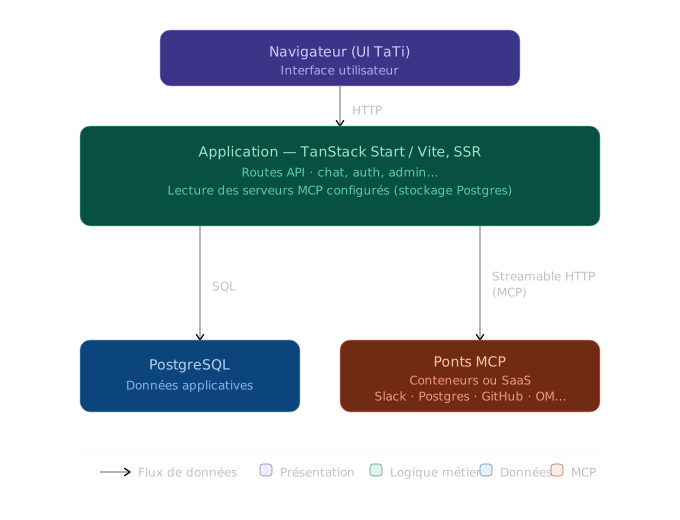
Legend: HTTP flows to the app; SQL to Postgres (app data); MCP uses streamable HTTP to bridges (Slack, Postgres, GitHub, OM…). The diagram distinguishes presentation, business logic, data, and MCP.
Application layer
- Frontend + SSR: chat UI, settings (including MCP servers), login screen when
TATI_AUTH_REQUIRED=true. - API: user sessions and enabled MCP URLs are persisted server-side (schema in the repo; migrations via scripts or deployment).
DATABASE_URL: Postgres connection string used by the app — distinct fromMCP_POSTGRES_DATABASE_URL, which is only for the Postgres MCP server to run SQL on behalf of the model.
MCP layer
Each connector is a separate process (often a Docker container) implementing MCP over HTTP (“streamable” transport). In TaTi settings you register:
- a base URL pointing at the
/mcppath (or the vendor URL for Gmail, Datadog, etc.); - optional headers (API tokens, Datadog keys, Moodle Bearer, Google OAuth…).
When the user sends a chat message, the app may invoke those servers depending on configuration and the tools each bridge exposes.
Example: Tableau + Atlassian
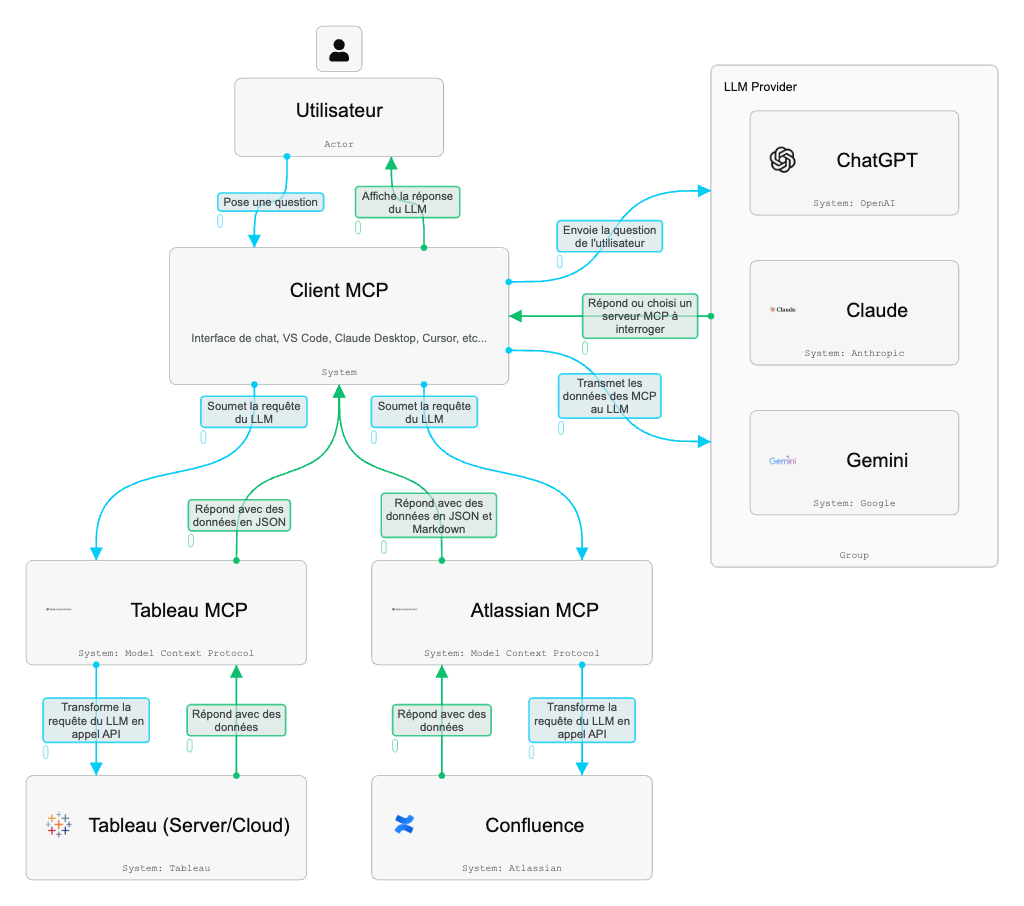
This diagram shows the general pattern for business connectors: the MCP client orchestrates the exchange with the LLM, then calls specialized MCP servers. Tableau MCP turns requests into Tableau API calls (REST, Metadata, VizQL, Pulse), while Atlassian MCP handles Confluence/Jira. Responses come back to the LLM as JSON or Markdown before being synthesized for the user.
Docker networking
On the same docker-compose.yml, services resolve by name:
- Example:
http://mcp-postgres:8002/mcpfrom theappcontainer. - From your host (
curltests), usehttp://localhost:<port>/mcpwith the port from.env(MCP_*_PORT).
Filesystem MCP security
The Filesystem MCP mounts a host directory (./ in dev) into the container at FILESYSTEM_ROOT (often /workspace). Reads/writes stay under that root: lock this down in production (dedicated volume, OS permissions).
Local auth
Local authentication does not replace MCP network security: even with user login, MCP services on an open network could be called directly. Keep MCPs on a private network or behind a firewall. Sessions are driven by TATI_SESSION_TTL_HOURS and the repo’s cookie / server-side storage.
Next reads
- Quick start — concrete commands.
- MCP connectors — per-service reference.
- Configuration — environment variables grouped.